
swift ui 如何配置开发配置
作者: boyyang
分类: Swift
发布: 2026-03-03 01:25:27
更新: 2026-03-03 01:28:06
浏览: 161
创建xcconfig文件
创建config.dev.xcconfig文件内容如下:
//
//  Config.xcconfig
//  Unsplash
//
//  Created by boyyang on 2024/9/19.
//

// Configuration settings file format documentation can be found at:
// https://help.apple.com/xcode/#/dev745c5c974

// 接口
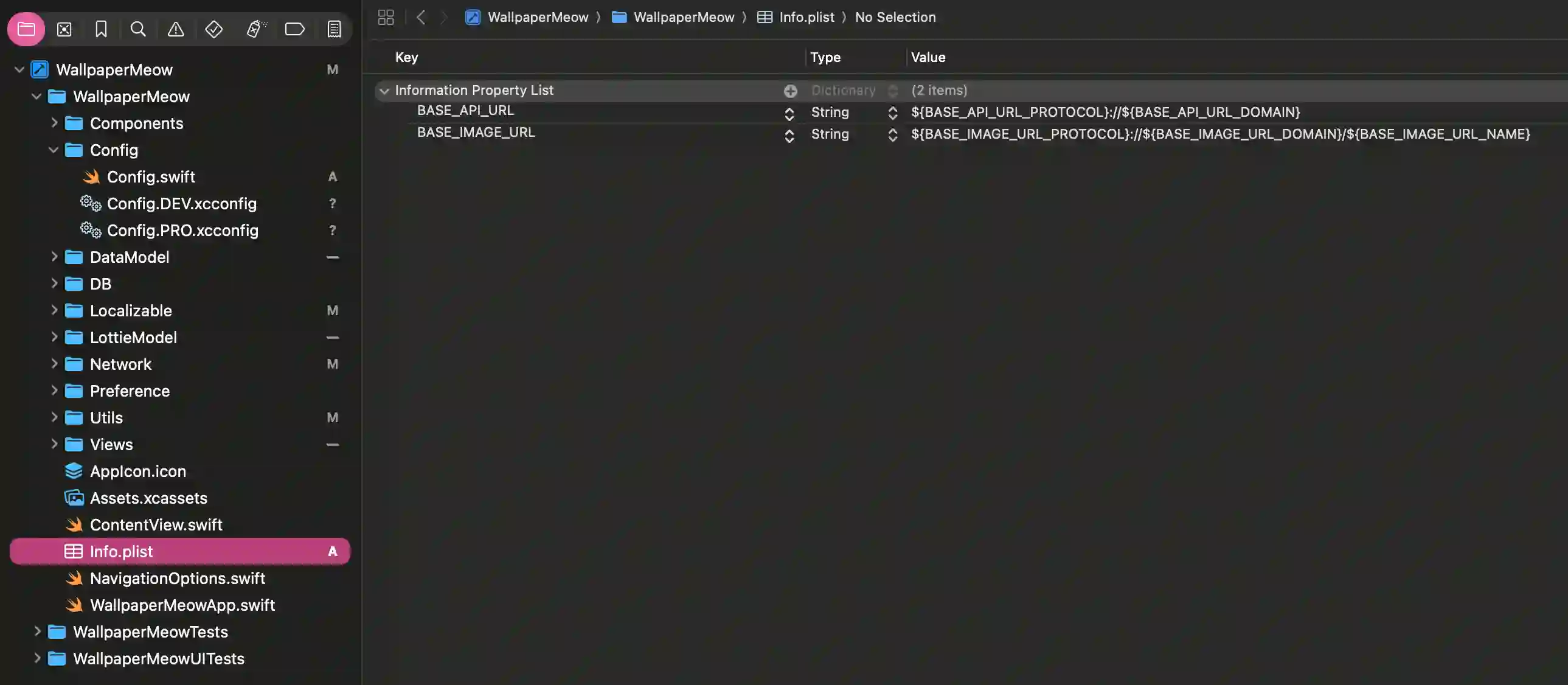
BASE_API_URL_PROTOCOL = http
BASE_API_URL_DOMAIN = 0.0.0.0:8888

// 图片资源
BASE_IMAGE_URL_PROTOCOL = https
BASE_IMAGE_URL_DOMAIN = xxx.myqcloud.com
BASE_IMAGE_URL_NAME = wallpaper
创建config.pro.xcconfig文件内容如下:
//
//  Config.PRO.xcconfig
//  Unsplash
//
//  Created by boyyang on 2025/4/25.
//

// Configuration settings file format documentation can be found at:
// https://developer.apple.com/documentation/xcode/adding-a-build-configuration-file-to-your-project

// 接口
BASE_API_URL_PROTOCOL = https
BASE_API_URL_DOMAIN = xxxx.cn

// 图片资源
BASE_IMAGE_URL_PROTOCOL = https
BASE_IMAGE_URL_DOMAIN = xxx.myqcloud.com
BASE_IMAGE_URL_NAME = wallpaper
创建config.swift文件读取配置:
//
//  Config.swift
//  Unsplash
//
//  Created by boyyang on 2025/8/2.
//

import SwiftUI

enum Config {
    static func value(key: String) -> String {
        guard let value = Bundle.main.object(forInfoDictionaryKey: key) as? String else {
            fatalError("配置键 \(key) 未在 Info.plist 或 xcconfig 中定义")
        }
        return value
    }

    static var BASE_API_URL: String {value(key: "BASE_API_URL")}
    static var BASE_IMAGE_URL: String {value(key: "BASE_IMAGE_URL")
配置info.plist
在页面中使用
//
//  GroupModel.swift
//  WallpaperMeow
//
//  Created by boyyang on 2026/2/5.
//

import SwiftUI

struct GroupInfo: Decodable, Identifiable, Encodable {
    var id: String
    var file_path: String
    var file_name: String
    var w: Int
    var h: Int

    func url() -> URL {
        let baseUrl = URL(string: Config.BASE_IMAGE_URL)
        return (baseUrl?.appendingPathComponent(self.file_path))!
    }
}